


Data Center & Administrative Solutions
Office Access Control Solution
Admin
18/08/2026
30 min read
Introduction to office access control solutions
Door control, also known as access control, is a door control system that operates based on advanced identification technology using cards, fingerprints, passwords, and installed IDs of individuals entering and leaving the place where the system is installed. Each individual will be issued an ID number, specifically a card, fingerprint, and face as an ID number. From there, access control will manage and decentralize based on the assigned ID number. At the same time, businesses can easily monitor entry and exit activities at the workplace.
Features of the access control system
– Assign access rights by group.
– Mode requires simultaneous authentication of two people to open the door
– Counts the number of people entering/exiting the area
– Open all doors or specify doors to open when an alarm or event occurs.
– Set up personal information management
– Online management and monitoring
Basic equipment in the office access control system
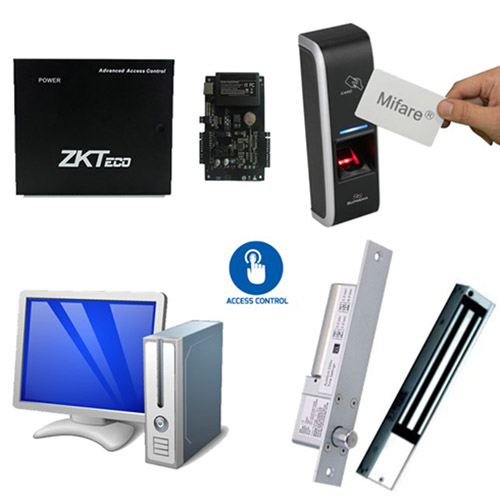
Each different door control system will have a different number or type of device. But in general, the system will include the following basic equipment:
a, Controller:
– Handles authentication information
– Controls peripheral devices such as lock, Exit
– Stores users, events, centrally
b, Reader
– Card reader
– Fingerprint reader
– Face reader
– Timekeeper
c, Network and computer systems
– Install system management software
– Usually applied to door systems
d, Release latch, electromagnetic
– Receive control signals to open/close the door
– Displays door open/close status
– Magnetic door lock, magnetic card lock, magnet lock, deadbolt lock
There are also exit button sets, auxiliary readers, emergency button sets, power supplies, components...
Basic model
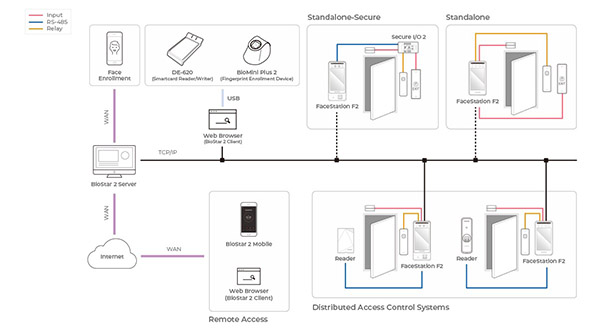
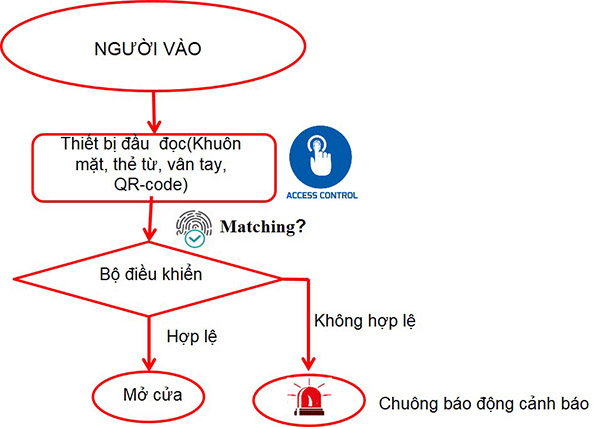
Office access and timekeeping management software
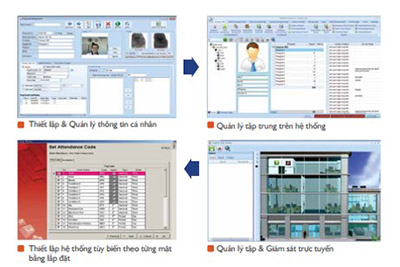
– Set up and manage personal information
– Centralized management on the system
– Online management and monitoring
– Set up customized systems for each installation site
Door control technologies
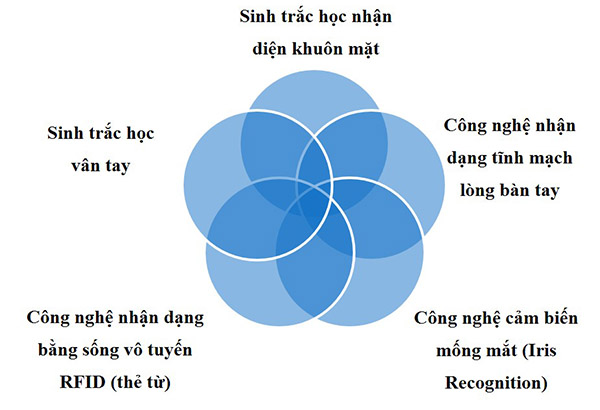
1, Control doors with fingerprints
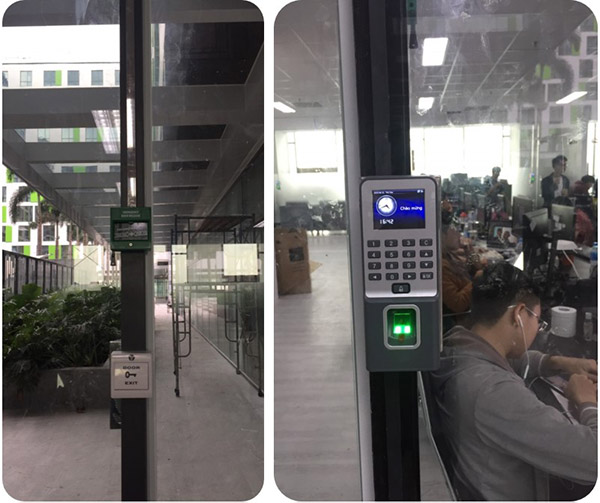
Solution to control office doors with fingerprints is mainly applied to offices today. The system operates based on each individual's fingerprint authentication. Devices in the solution include: fingerprint door control device, fingerprint auxiliary reader, magnetic lock, latch release lock, exit door opening button, door sensor, and other accompanying devices.
Operating principle of fingerprint door control
The devices are installed in the office on wooden doors, glass doors or iron doors... Depending on the needs and situation, the system will select appropriate accompanying devices.
– For wooden or iron doors, you should use a magnetic lock. Because this type of lock has strong suction power, it will hold the door more firmly.
– For glass doors, you should use a drop-latch lock. Because using this type of lock has enough suction power to avoid breaking the glass when suction is too strong.
To operate and access the office area, an automatic door control system has been installed. The user will need to be given a fingerprint code in the database. Then, the user only needs to scan their fingerprint into the fingerprint reader device. The information will be verified, if the correct reader transmits a signal to the lock and then the lock will automatically disconnect the electric current; The door will open automatically or stop smoking. And all input and output data will be recorded in the system. Users can get in and out more easily and conveniently.
Advantages of this system
– Can effectively accommodate small and medium-sized companies with up to 20,000 identification fingerprints.
– Solution to easily operate, process and export data quickly over the network, via USB. Export time in and out using a simple excel file.
– Supports connection via network ports TCP/IP, RS-485, RS-422, RS-232, wifi.
2, Control doors with magnetic cards
Control office doors by card or magnetic card, FRID uses mifare or proximity chip authentication technology which is the ID of each individual embedded in each card.
Principle of operation
Each department door will be equipped with an electromagnetic door lock system and a touch card reader (or card reader + exit button), using electromagnetic lock control.
The readers of the magnetic card door control system at the entrance will be connected to each other. At the same time, data also stored at the reader will be transmitted to the access control software on the manager's computer.
Each employee will own a touch card and can create an employee card (with full information as needed). This card will be used to open doors to offices or departments that are authorized to access.
To access departments, the employee needs to authenticate with his or her employee card on the card reader. If valid, the door will automatically open and vice versa.
Data about employee information, card swipes, and check-in times will also be transmitted to the management software (if the system is equipped with management software).
3, Control doors with facial recognition
For solution control office doors with your face, instead of authenticating with fingerprints or magnetic cards, access control technology uses facial recognition to authenticate access. Usually applied to high-end offices, integrating timekeeping and door control.
Advantages of office access control solutions
– Solution controls office doors with automatic devices that help overcome the limitations of conventional control methods with mechanical locks, security guards...
Limitations are fixed such as:
+ Ensures more security, based on more secure authentication.
+ Faster. Because each card swipe or fingerprint or face confirmation is done quickly (only a few seconds). Avoid congestion and employees will be more satisfied at work.
+ Save costs. There is no need for too many security guards (or even at all). The system is a one-time investment and long-term use, so it helps save costs for that office.
– Solution that contributes to building a more professional and modern environment.
Recommended basic office access control set
– Glass door access controller:
+ F18 controller, Magnet lock/latch release, exit door open button, Lock holder, Power supply, Fingerprint auxiliary reader;
+ DG-600ID controller, Magnetic lock/latch release, exit door open button, Lock holder, Power supply, Fingerprint auxiliary reader
+ Smart AC1 controller, Magnetic lock/latch release, exit door open button, Lock holder, Power supply, Fingerprint auxiliary reader
+ AR-725H controller, Magnetic lock/latch release, exit door open button, Lock holder, Power supply, Fingerprint auxiliary reader

– Door control set for wooden doors, aluminum and glass doors, fireproof panel doors:
+ Machine F19, Magnet lock/latch release, exit door open button, Lock holder, Power supply, Fingerprint auxiliary reader;
+ DG-600ID controller, Magnetic lock/latch release, exit door open button, Lock holder, Power supply, Fingerprint auxiliary reader
+ SF200 control unit, , Magnetic lock/latch release, exit door open button, Lock holder, Power supply unit, Fingerprint auxiliary reader
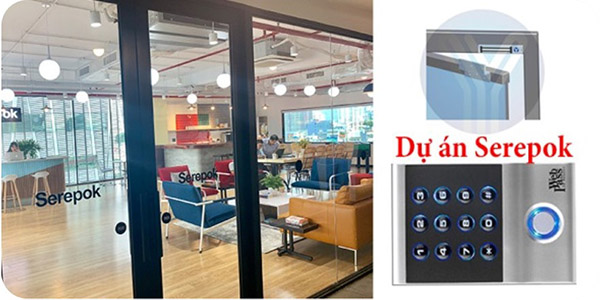
Easynet provides a complete office access control solution
Currently, there is a need to install equipment controls office doors is quite popular. With many choices of suppliers and installation units, Easynet is one of the reputable companies that a large number of customers, companies, and agencies choose to cooperate with. Prestige is recognized through many completed projects and positive reviews from customers.
Experienced in electronics and quick door handling
Hiring a construction unit will help you save maximum time, while installing and installing equipment accurately and with the highest efficiency.
Select the appropriate device
Suitable for your needs, characteristics and investment budget. Currently, there are many methods of door access control such as fingerprint control, magnetic card, face control...
Besides, you need to choose the type of lock that is suitable for the door you use, such as a suction lock or latch lock, or if you need accompanying accessories.
Check and test the device before installing
It is necessary to check and test the device first. Construction units will often test the product before installing it for customers. Ensure the construction process takes place quickly and operates accurately.
See more office security solutions
